
What we do
We gather the image tasks you need most—JPG/PNG conversion, PDF packaging, HEIC-to-JPG conversion, resizing, and file size compression—all in one place. You don't need to install software or create accounts. If you have a web browser, you can start immediately.
We named our tool 'Switching' to represent changing image formats as easily as plugging a device into an outlet. We focus on a simple, frictionless experience: drop your file, get your output, and move on.
Our core promise: your files stay on your device
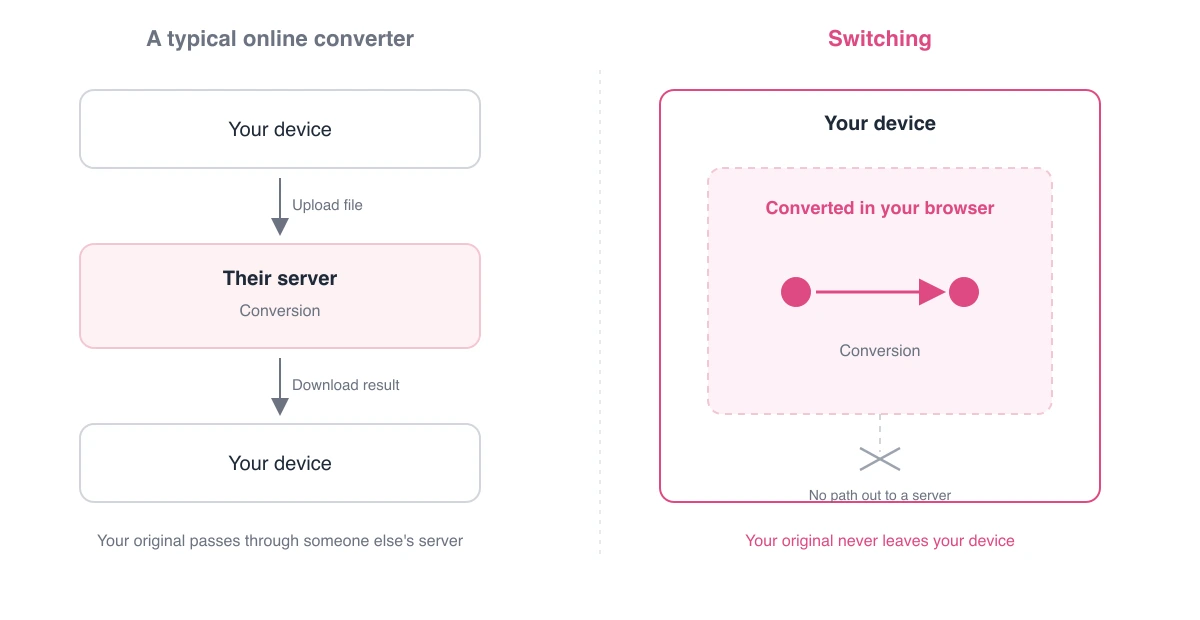
Most online converters force you to upload files to their servers, process them remotely, and send them back. This means your files live on someone else's server, raising questions about data storage and deletion.
We designed Switching to do the opposite. We run every conversion locally in your browser. We never transmit your images to our servers or send them across the network. Your files stay in your hands from start to finish.
How local processing works
Modern browsers pack incredible image processing capabilities. Switching uses built-in features (like the Canvas API and WebAssembly) to convert formats accurately without relying on remote servers. We leverage the processing power your device already has.
This model brings major advantages. First, keeping files local guarantees absolute privacy. Second, skipping file uploads and downloads speeds up your workflow. Third, once you load the page, it works smoothly even on unstable internet connections.
- Convert sensitive files—like IDs, agreements, or family photos—with absolute confidence.
- Process massive files instantly with zero upload delay.
- Convert dozens of files at once using batch processing.
Our approach to privacy
We believe you shouldn't have to share personal information to use a simple tool. We do not require sign-ups, log-ins, or payments. We cannot read or analyze your files because they never reach our servers.
Running a website does require minimal traffic analytics. We spell out exactly what that involves in our Privacy Policy and Cookie Policy.
Why Switching is free
We offer Switching for free because converting image formats is a basic task everyone encounters. While hosting the site and developing features costs money, we cover these expenses using non-intrusive ads or future sponsorships. We will never compromise on our core principle: your files stay on your device.
Our roadmap
We plan to expand our toolkit with support for modern formats like WebP and AVIF, smarter compression algorithms, and better batch workflows. If you find a bug or want to request a feature, share your thoughts through our contact page. Your feedback shapes what we build next.